

Payroll Services for Construction and Contractors
Union payroll, prevailing wage, certified payroll and contractor-specific reporting handled by a team that already knows your industry.
What Is Construction and Contractor Payroll?
Contractor payroll handles the extra complexity contractors face, including multiple jobs, pay rates, classifications, union locals, prevailing wage, certified payroll, and job costing.
The goal is simple: get every employee paid correctly and every required report done right.
How Is Contractor Payroll Different From Regular Payroll?
A construction employee may work different jobs, rates, classifications, or union locals in the same week. That creates payroll, reporting, and compliance requirements that standard payroll systems often struggle to handle.
If contractor payroll has been a problem, this probably sounds familiar.
You manage union workers. Probably across multiple locals, maybe multiple states.
You've been through payroll companies that swore they could handle it.
Your certified payroll was wrong. Your setup didn’t meet union or prevailing wage requirements.
You're ready for payroll to just work. That's exactly what we do.
Here's how we do it.
Three things. Every payroll. Every employee.
Accuracy
Your rates, classifications, and benefit calculations are built into our system. When something changes, we handle it. You hear about issues from us.
Not from an auditor.
Reporting
Certified payrolls. Union remittances. Prevailing wage compliance. Job cost reports. Everything your union, your GC, and the DOL require.
On time, every time.
Support
Every person on our team works exclusively with contractors, union and non-union prevailing wage. When you call, we already know your world.
No explaining from scratch.
Trusted By Locals
Zuma Payroll can handle the most complex needs of any union in the country.






What Should a Contractor Company Look for in a Payroll Provider?
And the four things most of them have never actually gotten.
- Account managers who already understand union agreements and prevailing wage rates. Not people learning it on your time.
- A system built for union and prevailing wage payroll. Not a workaround bolted onto software designed for someone else.
- Job costing and certified payroll reporting in the same system. No exporting, no re-keying data
- Integration with Sage, QuickBooks, Vista, and more. Your payroll and job cost data flow where they need to go.
With Zuma, you get all four.
How Does Certified Payroll Work for Contractors?
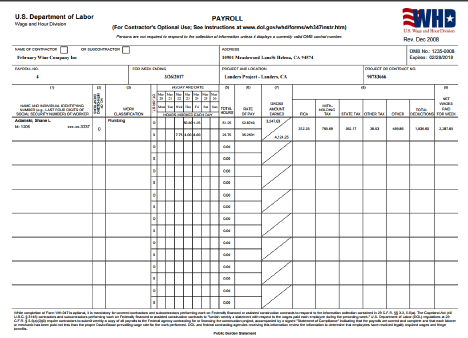
WH-347 (Davis-Bacon), NYS DOL Portal, NJ Certified Payroll Portal, State forms, paper reports, and integrations with LCP Tracker, LCMS, eMars, and more.
Your certified payroll is generated directly from payroll data — no manual reconstruction, no re-entering information that already exists.
Every report your GC, your owner, or your state requires.
On time. In the right format.
How Does Workers’ Comp Reporting Work for Contractors?

We build clean, audit-ready reporting directly from your payroll:
- Workers' comp audit reports, organized and ready when you need them
- Wrap-up reporting (OCIP, CCIP, ESIP) by job and classification
- Clear records that cut the back-and-forth with GCs, carriers, and auditors
No scrambling. No rebuilding reports. No surprises when the audit hits.
Pay-As-You-Go Workers’ Comp Billing
Premiums calculated on real payroll each pay period, so you only pay for what you actually run:
- No large deposits or upfront payments
- Weekly wage caps applied correctly
- Fewer adjustments at year-end
When your payroll data is right, your costs follow.
Contractor Payroll Questions We Hear Most Often
We know there are specific questions you want answers to. So we’ve put together a list of answers to help you make an informed decision.
Union Specific Capabilities
Can you handle payroll across multiple states and multiple union locals at the same time?
Yes. Zuma processes payroll for contractors working across multiple states and multiple union locals simultaneously. Some clients are running 15 or more locals across several states on a single weekly payroll. The system handles the different benefit rates, tax jurisdictions, and reporting requirements for each local and each state without requiring separate payroll runs. State unemployment accounts, tax filings, and local tax withholdings are all managed as part of the service, including filing zero returns in states where you have an active account but no current employees.
Do you support direct uploads to union portals like iRemit, ISSi, NECA, Empower, and the EPR?
Yes. For unions that have upload-capable portals, the system auto-generates the upload file each week as part of your regular payroll archive.
- Carpenters (iRemit): Upload files are generated for each applicable Carpenter local portal. The first time you upload, there's a one-time mapping process to align classifications between the two systems. After that, it's download from Zuma, upload to iRemit
- Local 3 IBEW (JIB): Zuma sends a consolidated file to the Joint Industry Board every Monday morning for all Local 3 contractors. You typically receive your invoice Monday afternoon or Tuesday morning. You don't have to fill anything out
- Empower: Retirement data is automatically sent on your check date
- Nika Star: For contractors with fewer than 50 employees, the system generates an Excel report formatted by jurisdiction that you use to enter into the portal
For unions that don't have upload portals, Zuma generates reports formatted to match the union's specific form, whether that's a locked Excel sheet, a PDF, or a paper transmittal. The goal is to give you exactly what you need to submit without re-entering data.
How do you handle unions that still require paper reports or use locked Excel spreadsheets for remittance?
Zuma generates a report formatted to match what the union expects. If they use a locked Excel sheet, your report will be structured so you can copy and paste the data into the correct fields. If they accept PDF submissions, Zuma's version can often be submitted directly. In some cases, contractors have started by submitting both versions (the union's form and Zuma's report) and eventually the union accepted just Zuma's version. If you have relationships with the people who receive your union reports, it's worth asking them whether they'll accept the Zuma format. Most are receptive as long as the data is correct and complete.
Can you fully automate WH-347 certified payroll reports, including page 2?
Zuma generates a report formatted to match what the union expects. If they use a locked Excel sheet, your report will be structured so you can copy and paste the data into the correct fields. If they accept PDF submissions, Zuma's version can often be submitted directly. In some cases, contractors have started by submitting both versions (the union's form and Zuma's report) and eventually the union accepted just Zuma's version. If you have relationships with the people who receive your union reports, it's worth asking them whether they'll accept the Zuma format. Most are receptive as long as the data is correct and complete.
What other Certified Payroll Versions & Formats can you produce automatically from your system?
Paper/PDF Certified Payroll Reports:
WH-347 (Federal Certified Payroll / Davis-Bacon report), New York City Comptroller Certified Payroll Report, DASNY Certified Payroll Report (Dormitory Authority of the State of New York), Port Authority Certified Payroll Report
Electronic or Portal Version of Certified Payroll Reporting:
LCMS, LCP Tracker, LCP Certified, eMars, SCA, NYSCH, DIR eCPR (California), NYS’s NEW Certified Payroll Report Portal, NJ’s NEW Certified Payroll Report Portal , Elations, and more…
How do you handle the Carpenters' optional weekly dues deduction?
The system supports both scenarios for the same union: where some employees elect to pay through payroll and others pay on their own.
When an employee is set up in the system under a Carpenters local, all mandatory benefits are automatically applied to their profile.
For the optional dues benefit, you indicate in the employee's profile whether they've elected to pay through payroll or on their own. If they've opted in, the deduction is calculated automatically each week based on hours worked, deducted from their check, and reflected on their pay stub. If they've opted out, that benefit is excluded from their calculation. You don't have to manually adjust this week to week. It's a one-time setup per employee.
Can your system process employees who have ITINs instead of Social Security numbers?
Yes. Zuma's system accepts ITINs.(TIN#’s start with the #9) This is a reality of New York construction and the system is built to accommodate it. Some payroll platforms have stopped accepting ITINs or make it difficult to process employees without a standard SSN. That's not an issue here.
How do you manage reciprocal agreements between union locals?
When an employee from one local works in another local's jurisdiction, benefits typically need to be paid to the working local, which then transfers them to the home local. Zuma tracks which local the employee belongs to and which local's jurisdiction the work is being performed in, and calculates benefits accordingly. The key exception is the Carpenters, who generally don't reciprocate between district councils. In those cases, paying benefits to the wrong local can result in being charged the full amount again even if you have proof of payment to the other local. Zuma's team is aware of these distinctions and helps ensure benefits are directed correctly to avoid audit exposure.
Can you handle shift differentials and multiple pay rates for the same employee across different jobs or locals?
Yes. The system handles multiple pay rates and shift differentials for the same employee in the same week. If a worker is a journeyman earning one rate on a day shift and a 5% premium on a night shift, and those are on different jobs in different local jurisdictions, all of that can be captured in a single timesheet entry. The custom timesheet approach is especially useful here. The sheet can be programmed so that shift time automatically calculates the correct differential based on the job. For example, PLA work might be a 5% premium while non-PLA work is 15%. That logic gets built into the sheet so you're not calculating it manually.
How do you manage different overtime rules when they vary by union and by job?
Yes. The system handles multiple pay rates and shift differentials for the same employee in the same week. If a worker is a journeyman earning one rate on a day shift and a 5% premium on a night shift, and those are on different jobs in different local jurisdictions, all of that can be captured in a single timesheet entry. The custom timesheet approach is especially useful here. The sheet can be programmed so that shift time automatically calculates the correct differential based on the job. For example, PLA work might be a 5% premium while non-PLA work is 15%. That logic gets built into the sheet so you're not calculating it manually.
How do you prevent and resolve Local-3 IBEW JIB reporting errors?
The most common JIB errors occur when there's a mismatch between how time is coded and what the JIB expects. For example, submitting overtime hours to a market recovery code or straight time to an LX code will generate an error. When that happens, Zuma's team fixes it on their end and resubmits the file to the Joint Industry Board for you. You don't have to troubleshoot the JIB file yourself. Beyond that, Zuma sends JIB files for about 60 to 70 Local-3 IBEW contractors every week, which means the team catches formatting issues and edge cases quickly. If a new rule or code change comes from the JIB, it's typically addressed across all clients at once rather than one at a time.
Can we start running non-union employees through the system while we wait for the union to accept and certify our workers?
Yes. The system has a non-union classification available, so you can process payroll for employees who haven't yet been accepted by the union. Once they're certified, their classification is updated to the appropriate union and local, and all the associated benefit calculations kick in from that point forward. You don't need to wait until everyone is fully certified to get started.
Pricing and Structure
How much does it cost, and is pricing based on headcount or payroll volume?
Pricing is based on a weekly base fee plus a per-employee charge for each person on that week's payroll. The base fee starts at $145 per week, and the per-employee rate starts at $4.45 per week. So if your crew is 20 one week and 35 the next, you're only paying for the employees you actually run. Smaller operations with fewer than 10 employees typically qualify for reduced rates. Multi-entity companies with several FEINs get volume pricing based on the full picture.
What's included in the base weekly fee versus the per-employee fee?
The base fee covers your account, the platform, payroll processing, tax calculations, direct deposits, and access to the service team. It also includes your payroll archive, which is where all of your weekly reports are stored automatically.
The per-employee fee covers everything that happens at the individual level:
- Pay calculations
- Union benefit calculations
- Tax withholdings
- Pay stub generation
Certified payroll reports, job cost reports, union remittance data, and standard weekly reporting are all generated as part of regular processing. There's no extra charge each time one of those reports runs.
Can custom reports be developed?
Contractors often request custom reports to either mimic reports they are already familiar with or to automate reports they are currently creating manually in Excel. These reports are commonly used for annual general liability audits, workers’ compensation audits, and union audits. Zuma frequently builds these types of reports for contractors.
Typically, there is a small one-time flat fee to create the custom report, after which it can be generated automatically within the software and downloaded weekly at no additional cost. Most custom reports are built in Excel format.
Are there additional fees for W-2s, quarterly filings, new hire reporting, or union maintenance?
Yes, and they're worth knowing upfront so nothing catches you off guard:
- W-2s: per-employee fee at year-end, plus a base processing fee
- Quarterly tax filings: A flat fee of $69 per quarter covers the preparation and filing of required company federal and state payroll tax returns, including Federal Form 941 (Quarterly Employer’s Federal Tax Return) and state quarterly payroll tax filings, which vary by state. Fourth quarter filings also include the annual Federal Form 940 (Federal Unemployment Tax Return).
- New hire reporting: small per-filing fee per new hire
- Union maintenance (CBA updates, rate changes, benefit table management): quarterly fee that covers ongoing maintenance of your union agreements in the system $125 Per quarter flat fee
- Additional tax jurisdictions: small per-run fee if you're processing payroll across multiple states or local tax areas. Only applies when multiple jurisdictions are active
Your proposal will itemize all of this so you can see exactly what applies to your situation before you commit.
Are volume discounts available for companies with multiple entities or FEINs?
Yes. For multi-entity operations, pricing is laid out per entity based on estimated headcount and then looked at as a full annual picture. The discount process is simple: propose a percentage across the board, it gets submitted, and the answer comes back quickly without a lot of back and forth.
What does year-end processing cost, and what's included?
Year-end includes a base processing fee plus a per-employee charge for W-2 preparation and distribution. W-3 filing and year-end reconciliation are included. Employees can also access their W-2s directly through their self-service portal, so they can download what they need without calling your office.
Year-end filing fees are based on issuing W-2s to every employee paid during the calendar year; even if an employee was paid only once, a W-2 must still be issued.
Fees include $8.50 per W-2 or 1099 issued, a $125 base W-2 processing fee, and a $75 company W-3 filing fee, which cover the preparation and filing of all required year-end w-2 & w-3 tax forms.
Accounting and Reporting
Do you offer QuickBooks general ledger integration with job cost allocation built in?
Yes. After payroll runs, an IIF file is generated that you download from the system and upload directly into QuickBooks. The file includes job cost allocation, so your labor costs flow into QuickBooks broken out by project without any manual journal entries. During implementation, Zuma's team works with your chart of accounts to build and test the file so the mapping is right before you go live. About 70% of Zuma's contractors use some form of general ledger integration, and QuickBooks Desktop is the most common.
What other construction accounting software do you integrate with (Sage, Vista, GEAC, etc.)?
Zuma supports integrations with QuickBooks Desktop, QuickBooks Online, Sage 300 CRE, Sage Intact, Sage 100, Sage 50, and Vista, Trimble, among others. If your construction accounting software accepts a CSV upload, Zuma's team can typically work with the vendor to get the file specs and build a custom upload file that maps to your chart of accounts. For any ERP Software, the recommendation is to involve your software vendor early in implementation so the mapping gets set up correctly the first time. The key is getting your chart of accounts finalized before the integration is built, because changes to the chart of accounts after setup can break the upload file.
Can you build custom reports, and how quickly are they typically turned around?
Zuma supports integrations with QuickBooks Desktop, QuickBooks Online, Sage 300 CRE, Sage Intact, Sage 100, Sage 50, and Vista, Trimble, among others. If your construction accounting software accepts a CSV upload, Zuma's team can typically work with the vendor to get the file specs and build a custom upload file that maps to your chart of accounts. For any ERP Software, the recommendation is to involve your software vendor early in implementation so the mapping gets set up correctly the first time. The key is getting your chart of accounts finalized before the integration is built, because changes to the chart of accounts after setup can break the upload file.
Do you have reports that mirror what the union invoice will look like so we can verify before paying?
Yes. In most cases we can generate a union report that closely mirrors the format the union requires, so you don’t have to manually complete those remittance forms each week. Because Zuma calculates all union benefits during payroll based on the hours and benefit rates, the system automatically produces a union report after each payroll run showing the hours, classifications, and total amounts owed. Contractors typically use that report to verify the totals and either upload it to the union portal or use the numbers directly, eliminating the need to re-enter the same payroll data into a separate union report.
For Local-3 IBEW contractors, Zuma also handles the electronic JIB remittance submission. After payroll runs, we generate a summary report showing the exact totals that were submitted electronically to the Joint Industry Board on your behalf. Those totals are the same ones that will appear on the JIB invoice you receive—usually a few days later—so you can review and verify the amounts before the invoice even arrives.
Can we preview how benefits are being calculated before we approve and submit payroll?
Yes. After you enter time and before you submit payroll, you can step through a preview that shows how benefits are being calculated for each employee. You can also preview a certified payroll report at that stage to verify that benefit rates and totals look correct before anything is finalized. This step is optional. Some contractors review it every week, especially early on. Others skip it once they're confident the system is calculating correctly. But it's always available if you want to verify before you hit submit.
Implementation
How long does the setup process take from agreement to first payroll?
The timeline depends on complexity, but for most union contractors the process takes roughly 3 to 6 weeks from the welcome call to your first payroll run. Simpler setups with one entity and a few locals can be on the shorter end. Multi-entity operations with many unions, multiple states, and custom reporting needs will be closer to six weeks. The clock starts on the welcome call, not on the back-and-forth before that. Gathering documents, signing the electronic agreement, and getting everything submitted typically takes a week or two before the welcome call even gets scheduled. Larry is upfront about this: rushing implementation makes for a bad experience for everyone. It's better to start the process early and push the first payroll date back if needed than to cut corners on setup.
What data and documents do you need from us to get started?
Before sending the agreement, Zuma collects a standard set of supporting documents. Our team handles the data transfer, so you won’t need to move any information manually:
- Voided check or bank account verification
- IRS letter or other official correspondence showing your legal name and address (Zuma builds your agreement matching the information on file with the IRS rather than the data from your current payroll provider.)
- State unemployment account information
- Workers comp information
- Employee W-4s and current pay data. (If you provide secure access to your existing payroll portal, we can retrieve this information for you.)
- Prior year quarterly tax filings
- Union locals and CBAs you're currently working under
- Copies of your current union remittance reports
- Certified payroll samples (if applicable)
If you're coming from another provider, Zuma may need login credentials to pull data directly. An NDA can be signed if needed. The more complete the package you submit upfront, the faster the welcome call gets scheduled and the smoother implementation goes.
What data and documents do you need from us to get started?
Before sending the agreement, Zuma collects a standard set of supporting documents. Our team handles the data transfer, so you won’t need to move any information manually:
- Voided check or bank account verification
- IRS letter or other official correspondence showing your legal name and address (Zuma builds your agreement matching the information on file with the IRS rather than the data from your current payroll provider.)
- State unemployment account information
- Workers comp information
- Employee W-4s and current pay data. (If you provide secure access to your existing payroll portal, we can retrieve this information for you.)
- Prior year quarterly tax filings
- Union locals and CBAs you're currently working under
- Copies of your current union remittance reports
- Certified payroll samples (if applicable)
If you're coming from another provider, Zuma may need login credentials to pull data directly. An NDA can be signed if needed. The more complete the package you submit upfront, the faster the welcome call gets scheduled and the smoother implementation goes.
What does the onboarding process look like, and who is involved from your side?
Once the supporting documents are submitted and the agreement is signed, a welcome call is scheduled with Zuma's implementation team. That call is the official start of the build. During implementation, the team sets up your entities, programs your union agreements (or confirms that the ones already in the system match your locals), maps your chart of accounts for accounting integration, builds any custom reports you've identified, and configures your timesheet entry process.
From your side, the people involved in weekly payroll should be on the welcome call and involved throughout the setup. If you use construction accounting software like Quickbooks or Sage, it's worth involving that vendor early so the integration gets mapped correctly. Larry's advice from the calls: the person who uses the software day to day isn't always the best person to set it up. If your accounting software has a support team or vendor, get them involved for the initial configuration.
Can we run parallel payrolls during the transition to make sure everything matches?
While we cannot run payroll simultaneously alongside your current provider, we do provide a sample payroll preview before your first live run. This allows you to review employee information, payroll calculations, and tax setup to confirm everything looks correct before processing payroll with Zuma.
The only item that will not appear in the preview is prior year-to-date payroll data, since that information comes from your previous provider. However, the preview gives you a clear view of how payroll will process before your first official run.
Who walks us through the first few payrolls, and how much support do we get during that period?
The implementation team walks you through the first several payrolls. For the custom timesheet process, they handle the upload into the system for the first few weeks while you focus on getting the time entry right on your end. They then walk you through doing the upload yourself, calculating benefits, and submitting to the system. The transition from supported to independent is gradual, not a handoff. Once you're running on your own, the service team is there for questions, issues, and ongoing support. These are the same people who only work with construction contractors, so when you call about a layoff check or a union audit request, they already know what you're talking about.
Service Model
Is there a contract, and what happens if we want to leave?
There's no contract. Zuma bills week to week, and if you decide to leave, you leave. No termination fees, no buyout, no lengthy exit process. Larry's perspective on this is straightforward: if you have to lock people in, it means you're not confident in your product. Zuma's approach is to earn your business every week. The only requirement to keep your account active is a minimum of one employee processed per week, even if that's just the owner or a spouse.
Is our account handled by a team that only works with construction and union contractors?
There's no contract. Zuma bills week to week, and if you decide to leave, you leave. No termination fees, no buyout, no lengthy exit process. Larry's perspective on this is straightforward: if you have to lock people in, it means you're not confident in your product. Zuma's approach is to earn your business every week. The only requirement to keep your account active is a minimum of one employee processed per week, even if that's just the owner or a spouse.
How quickly can we expect a response when we have a question or an issue?
There's no contract. Zuma bills week to week, and if you decide to leave, you leave. No termination fees, no buyout, no lengthy exit process. Larry's perspective on this is straightforward: if you have to lock people in, it means you're not confident in your product. Zuma's approach is to earn your business every week. The only requirement to keep your account active is a minimum of one employee processed per week, even if that's just the owner or a spouse.
If something goes wrong with a payroll run or a union report who do we contact and how fast is the resolution?
Union contractors deal with many payroll and reporting situations that require adjustments during or after payroll is processed, and when those situations come up, clients work directly with the same contractor service team that already knows their account—there’s no separate support queue or ticketing system to navigate.
For example, sometimes an employee’s hours are entered incorrectly and they are underpaid, requiring a manual check to be issued so the employee receives the correct wages right away. In other cases, the employee may have been paid correctly but their hours were charged to the wrong job, which means the job costing and certified payroll reports must be corrected to reflect the proper project. The same process applies to union reporting as well.
For example, if a Local-3 IBEW JIB remittance file has an error, the contractor simply sends it to the service team and they correct and resubmit it. If a union audit comes in and the findings don’t look right, the team reviews the audit against the contractor’s actual payroll data, identifies where the calculations may be incorrect, and helps prepare the response—something Dave personally handles for many Local-3 clients.
In this industry, issues are expected; what matters is how quickly they’re resolved and having a team that understands contractor payroll handling the corrections with you.
Is there after-hours support available for urgent issues?
Union contractors deal with many payroll and reporting situations that require adjustments during or after payroll is processed, and when those situations come up, clients work directly with the same contractor service team that already knows their account—there’s no separate support queue or ticketing system to navigate.
For example, sometimes an employee’s hours are entered incorrectly and they are underpaid, requiring a manual check to be issued so the employee receives the correct wages right away. In other cases, the employee may have been paid correctly but their hours were charged to the wrong job, which means the job costing and certified payroll reports must be corrected to reflect the proper project. The same process applies to union reporting as well.
For example, if a Local-3 IBEW JIB remittance file has an error, the contractor simply sends it to the service team and they correct and resubmit it. If a union audit comes in and the findings don’t look right, the team reviews the audit against the contractor’s actual payroll data, identifies where the calculations may be incorrect, and helps prepare the response—something Dave personally handles for many Local-3 clients.
In this industry, issues are expected; what matters is how quickly they’re resolved and having a team that understands contractor payroll handling the corrections with you.
Operations
What is the cutoff time for submitting payroll each week?
One of Zuma’s biggest strengths is the speed and flexibility of our payroll processing. In many cases, contractors can process payroll as late as 3:00 PM the day before payday and still have direct deposits hitting employees’ accounts the next morning. For example, if your payday is Friday, it is technically possible to run payroll Thursday afternoon and still fund payroll for Friday, even if you have a very large payroll liability—sometimes $1,000,000 or more. Most payroll companies simply cannot support that kind of turnaround time. Another advantage is that contractors have the option to print their own checks in-house. When pay periods are tight, waiting for a courier delivery isn’t always practical, so many contractors prefer the ability to print checks themselves while the majority of employees receive direct deposit. A good example is Steamfitters Local 638, where the pay period ends Tuesday and payday is Wednesday. Because the turnaround is so tight, many employers process payroll Tuesday, print any needed checks in their office, and have direct deposits ready for Wednesday, allowing them to meet the union’s required pay schedule without relying on overnight courier services. This combination of 24-hour payroll capability, flexible funding options, and in-house check printing gives contractors the ability to meet demanding union pay schedules that many traditional payroll providers struggle to accommodate.
If you print checks for us, when are they printed and when do they arrive?
Checks are printed at Zuma's office in Melville, Long Island. Once printed, they're left for the courier service, which picks them up that evening. Delivery is typically by end of business the following day, though earlier delivery is possible depending on your location and the courier relationship. Larry's recommendation is to establish a relationship with the regular courier driver so that you can work out a consistent delivery window. If you need checks by midday, that's a conversation to have upfront so expectations are set with the courier from the start.
Can we print checks ourselves from our office, and what do we need to do that?
Yes. You can print payroll checks yourself if you don’t want Zuma to print and courier them, or if there isn’t enough time between entering payroll and needing the checks in hand. Many contractors prefer this because they sometimes need to get checks out to the field or a job site quickly and can’t always wait for a courier delivery.
Checks can be printed on standard 8.5 × 11 blank check stock (check on the bottom). The stock is available on Amazon for about $35 for 500 sheets, and no special printer is required. After payroll runs, you simply download the check file and print from your office.
You can also mix payment methods. Many contractors only print a few live checks, while the rest of the employees are paid by direct deposit and view their paystubs in the employee portal.
This setup is very common when only a few employees are not on direct deposit. It also avoids weekly delivery fees and allows for same-day checks when needed (for example, layoff checks).
Can employees split their direct deposit across multiple accounts?
Yes. Employees can split their direct deposit across as many accounts as needed. The first account is set up as a fixed dollar amount (for example, $100 to a savings account), and the final account is set as "remaining net," which catches everything else. We've seen employees split their deposit five different ways, so there's no practical limit.
Do you generate positive pay files for fraud prevention?
Yes. Positive pay files are generated as part of the payroll process. If your bank uses positive pay to verify checks before clearing them, Zuma provides the file in the format your bank requires. This was specifically discussed in the D'Onofrio conversations, where all 800+ employees receive physical checks and positive pay is part of their standard fraud prevention process.
How do layoff checks work, and how quickly can they be produced?
If you're printing checks in your office on blank stock, a layoff check can be produced the same day. You process it through the system and print it right there. If Zuma is printing and couriering checks, the timeline depends on when the request comes in relative to the print schedule. This is one of the reasons Larry recommends that contractors keep blank check stock on hand even if Zuma normally handles printing. Having that capability in your office means you can cut a final check within about 45 minutes when someone needs to be paid out on the spot.
Can third-party deductions like credit union payments be sent via ACH automatically, or do we have to mail checks separately?
They can be sent automatically. Third-party deductions like credit union payments are set up as a recurring deduction on the employee's profile, and the payment is ACH'd directly to the third party. You don't have to manually mail a check each period. Dave described it as similar to how child support garnishments work: the deduction is taken, and the payment is sent electronically to the agency or institution. This was a specific improvement over how some contractors had been handling credit union payments previously, where the deduction was taken from the employee's check but the employer had to manually cut and mail a separate check to the credit union.
Time Entry and Field Operations
Do individual field workers need to download an app, or can foremen enter time for their crews?
No, individual field workers do not need to download an app. Zuma offers several ways to capture time, and the setup can match how your crews actually operate.
While employees can punch in and out using a mobile app (with optional GPS or geofencing), most union contractors prefer a foreman-based process where one person enters time for the entire crew.
Common time entry options include:
- Foreman entry (most common)
Foreman enters hours for their crew by employee, job, and day. This works well when workers move between jobs or tasks during the same day. - Employee mobile punch (optional)
Employees clock in/out on their phone or tablet. GPS/geofencing can restrict punches to the jobsite. - Custom spreadsheet upload
Foremen or PMs enter time in a custom Excel or Google Sheet that maps directly into the payroll system. - Direct entry in the payroll platform
Hours are entered directly in the payroll grid by employee, job, and day. - CSV upload / third-party integration
If you already use another time and labor system, ERP, or field reporting software, you can export the time data and upload it into Zuma. We do not force contractors to use our time system if they already have one that works. As long as the data can be exported, it can usually be imported into the payroll platform using a simple download/upload process. In many cases we encourage contractors to keep the tools they already like and just integrate the time data into payroll.
Many contractors also track cost codes or phase codes, allowing you to record not just the hours worked but what type of work was performed on the job for more detailed job costing.
The right setup depends on crew size, number of foremen, and how tech-comfortable your team is. The goal is to choose the method that fits how your operation already runs, not force a single system.
Can we keep using our existing spreadsheet process for collecting time from the field?
Yes, and this is one of the things that tends to resonate most with contractors during demos. If your foremen are already entering time into Google Sheets or Excel, Zuma can build a custom timesheet around that same workflow. The sheet is customized to your operation: your job codes, your unions, your classifications, your shift differential rules. It includes built-in verification tabs that let you double-check entries by employee, by job, or by crew totals before anything goes into the payroll system. The data flows from the sheet into Zuma's platform, so there's no re-entry. The biggest adjustment most contractors mention is that dates run down the sheet instead of across, but beyond that the process feels familiar because it's built around how you already work.
How does geofencing work, and can I see where employees punched in?
Geofencing is an optional feature within the time and attendance platform. You can set up geographic boundaries around job sites, and when an employee punches in on their phone, the system checks whether they're within that boundary. If they're outside the fence, the punch is flagged.
Even without formal geofencing, every mobile punch captures the GPS location. From the admin side, you can see on a map exactly where each employee was when they punched in. Employees don't see this information on their end. So even if you don't set up formal geofences, you still have location data on every punch.
Larry's take on this from the calls: many contractors who initially think they need geofencing realize the GPS capture alone gives them what they need, and it doesn't cost extra. Geofencing is available if you want the added layer of enforcement, but the location visibility is there either way.
Can the system track PTO balances and handle time-off requests?
Yes. The system can track PTO, sick time, vacation, or any combination you use. If you bundle everything into a single PTO bank, it tracks that balance. Employees can submit time-off requests through their portal, and those requests come to you (or whoever you designate) for approval. This replaces the need to track balances in a separate spreadsheet. Some contractors also use the time-off request feature for union workers who don't earn PTO but still need to notify the office when they won't be in. They click "not in today" through the portal, and the office knows without a phone call.
Employee Self Service
How do employees access pay stubs and W-2s if everyone is on direct deposit?
Every employee gets access to a self-service portal. They receive a registration email when they're set up in the system, and from there they can log in from any device: phone, tablet, or computer. The interface adapts to whatever device they're using. Through the portal, employees can view their full pay history for the life of your account. Zuma doesn't purge pay records after a couple of years the way some systems do. Everything stays accessible. Employees can download individual pay stubs or pull multiple stubs at once, which is useful when someone needs their last three pay stubs for a mortgage or car loan. W-2s are also available through the portal at year-end, so employees can download their own without calling the office. For union contractors with high turnover, this is especially useful. A worker who was with you for two months can still pull their W-2 at the end of the year without anyone on your team being involved.
Can employees update their own tax withholding and direct deposit, or does that have to go through us?
That's entirely up to you. By default, tax withholding and direct deposit information is view-only for employees. But you can open it up so employees can make changes on their own. You can also set it up on a per-feature basis. For example, you might let employees update their tax withholdings (number of dependents, filing status) but keep direct deposit locked so those changes come through you. There's also a middle option: employees can submit changes, but those changes come to you for approval before they take effect. Larry's recommendation from the calls is that giving employees control over their own withholdings saves your team time and puts the responsibility where it belongs. If someone ends up owing at the end of the year because they claimed too many exemptions, that was their choice, not something your office misconfigured. But every company is different, so the system supports whatever level of control you're comfortable with.
Compliance and Tax
Do you handle all payroll tax filings at the federal, state, and local level?
Yes. Zuma handles all payroll tax filings across federal, state, and local jurisdictions. That includes federal income tax, Social Security, Medicare, state income tax, state unemployment, and local taxes like New York City resident tax and Yonkers resident tax. The system is driven by zip code, so when you enter an employee's address, the correct local tax withholdings populate automatically. You don't have to figure out whether a zip code falls within one of the five boroughs or a Yonkers jurisdiction. If you have active state unemployment accounts in states where you're not currently running employees, Zuma can file zero returns to keep those accounts active so they're ready when you need them.
How do you manage state-specific requirements like Washington paid leave, New York commuter tax, or other jurisdictional rules?
State-specific requirements are built into the system based on where your employees are working and where they live. Washington paid leave, New York commuter tax, state disability, paid family leave, L&I, and similar state-mandated programs are all handled as part of standard processing. When these requirements change (new rates, new thresholds, new programs) the updates are made on Zuma's end. You don't have to track legislative changes or manually update rates. If you're operating in multiple states, each employee's tax setup reflects the rules for their specific work and resident locations.
Do you handle ACA reporting (1094/1095)?
Yes. ACA reporting including 1094-C and 1095-C preparation is part of the service offering.
There may be additional fees for this. Please ask for your specific situation.
Can you support companies that are subject to DCAA government audits with the level of detail those audits require?
DCAA audits aren't something we specialize in, so if that's a primary requirement, we want to be upfront about that rather than overcommit. What we do support extensively are the audits most construction contractors actually face: union audits, workers' compensation audits, general liability audits, and similar compliance reviews.
For those, the system captures payroll data at a level of detail that makes audit response straightforward. Breakdowns by employee, pay period, project, and cost category are built into how we process every week. When an audit request comes in, you're pulling from complete records rather than trying to reconstruct information after the fact. The custom report builder lets you create whatever output format the auditors need.
If you're primarily asking because of the granularity and documentation standards DCAA requires, that discipline is baked into how we operate. We just want to be clear about where our specific expertise sits.
When a union audit comes in, do you help prepare the response and provide the supporting data?
Yes. Supporting our contractors during union audits is a normal part of the service.
Union benefit audits are very common and typically occur every 1 to 3 years. Because our system tracks the same data the union requires, week by week, employee by employee, and every benefit calculation down to the penny, we can quickly generate the reports needed to support the audit.
How the process usually works:
- You receive the audit request from the union
- Forward the request to the Zuma service team
- The team reviews the union’s findings against your actual payroll records
- We prepare the reports and supporting documentation
- You provide those reports to the union auditor
Zuma calculates all union benefits on a weekly basis, even for unions that only require monthly reporting. This means the supporting data is already organized by employee, by benefit, by week, making it easy to verify the union’s findings.
The service team compares the union’s calculations to the payroll data in Zuma and identifies where any differences exist. In many cases, discrepancies actually come from the union’s calculations, not the contractor’s payroll records.
Because the benefit calculations and payroll records are already documented week by week, contractors are not scrambling to reconstruct records when an audit request arrives.
In fact, we have helped contractors recover millions of dollars from unions when audit findings were incorrect. Sometimes unions attempt to collect money that is not actually owed, and in other cases the detailed payroll data shows the reverse, that the union owes money back to the contractor.
If the union auditor has questions, you can forward those questions to us, and we will help prepare the responses. If needed, we can also speak directly with the auditor to explain the data.
Our team has been through this process many times and understands what unions are looking for and how to present the data clearly, helping contractors resolve audits efficiently. This level of support is part of what we call audit readiness.
Ready to Talk to a Construction Payroll Expert?
Schedule a call with a payroll expert who already understands construction, union payroll, and prevailing wage.